Build powerful API integrations for WordPress.
WP API Forge connects external REST APIs to your site. Configure requests, authenticate, test responses and display live data with a block or a shortcode, instead of rebuilding a custom integration from scratch.
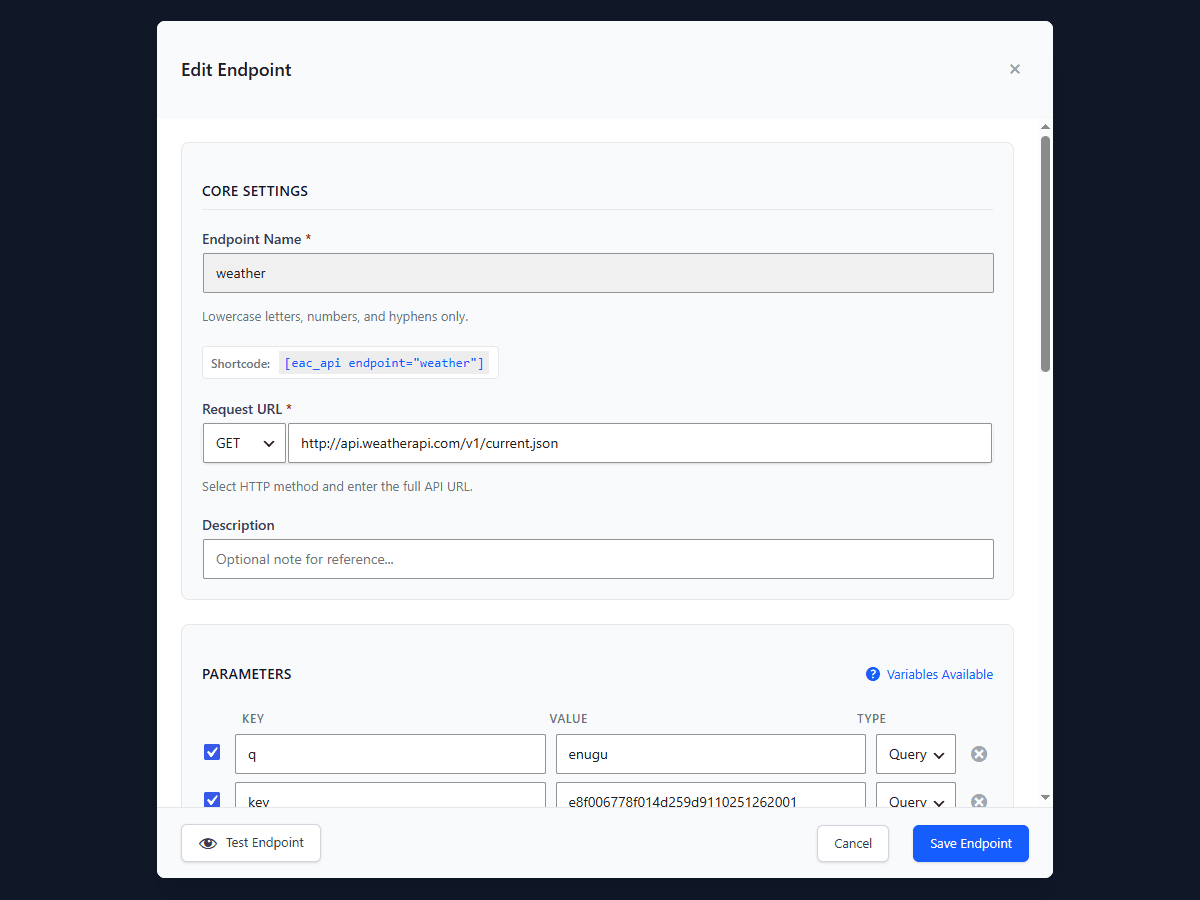
api.weatherapi.com/v1/current.json
?q=london&key={{const.EAC_API_KEY_WEATHER}}
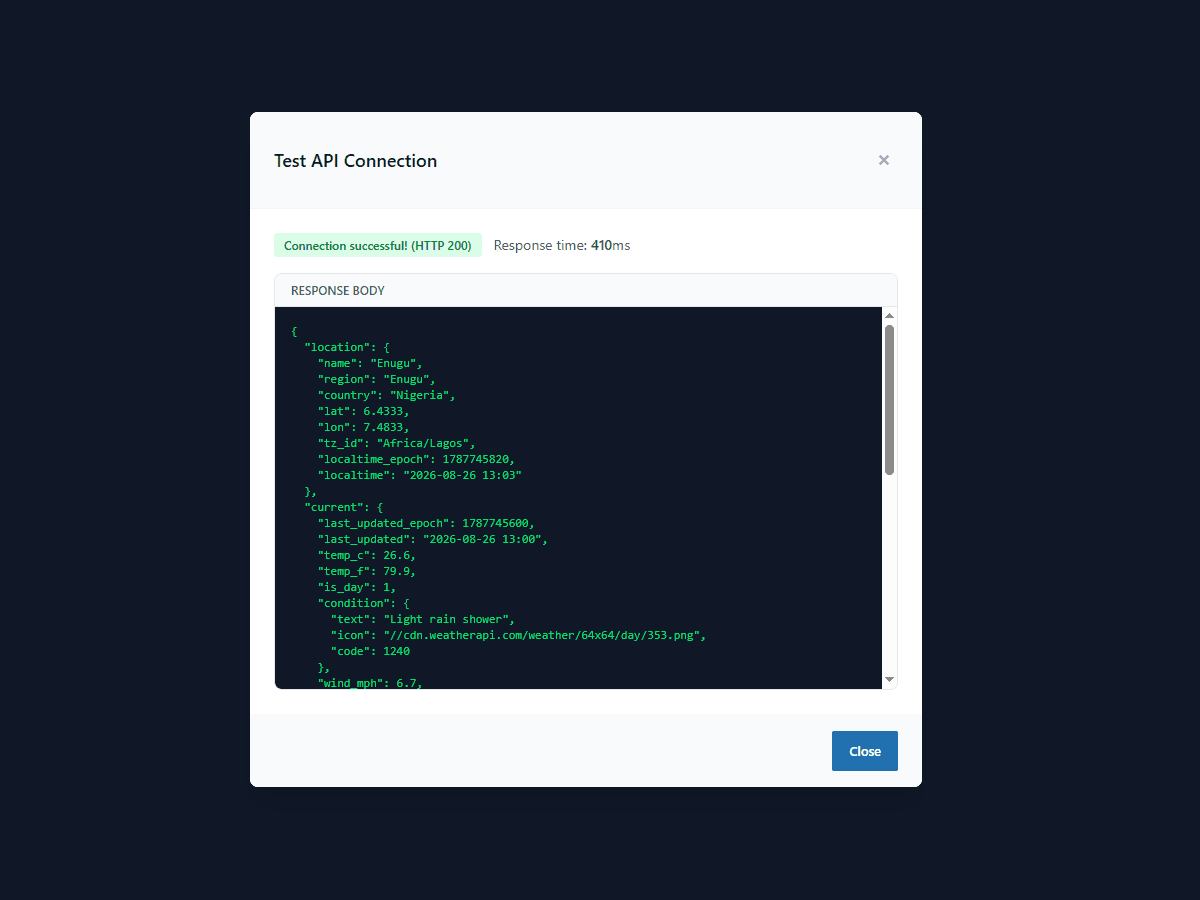
{ "current": { "temp_c": 21.3, … } }
current.temp_c
[eac_api endpoint="weather" json_path="current.temp_c"]
Today in London: 21.3°C
The problem
The data your site needs lives somewhere else.
The booking system knows what is available. The inventory system knows what is in stock. The CRM knows the account, the SaaS platform knows the price, and the internal service knows the number your team quotes on the phone. None of them is WordPress, and the website is where customers actually look.
Traditionally, closing that gap means custom development: a developer writes a bespoke integration for one endpoint, and the next data point is another ticket, another deployment, another thing only they can maintain. WP API Forge turns that into configuration — the connection, the authentication, the caching and the display are set up once, in the admin, and reused for the next API.
What it does
A configurable bridge between WordPress and any REST API.
Point WP API Forge at a REST endpoint, give it the credentials the API expects, and test the call from inside WordPress. Once the response looks right, pick the values you want with a JSON path and place them on a page with [eac_api] or the Gutenberg block. What renders is the live answer from the source, cached for as long as you say it should be.
It is not a no-code claim for every case. The standard read-and-display workflow genuinely needs no code. Advanced work — custom loop templates, hooks, JavaScript triggers, programmatic endpoints — is where PHP and JavaScript still earn their place, and there is a documented developer API waiting for it.
How it works
Five steps, start to page.
- 01
Connect
Enter the API endpoint and the authentication it expects — an API key, a bearer token, basic auth, or OAuth 2.0 on Pro.
- 02
Configure
Set the request method, headers, query parameters and body. Free covers GET; Pro adds POST, PUT, DELETE and PATCH.
- 03
Test
Send the request from the admin and read the raw response, status code and timing before anything touches a page.
- 04
Map
Point a JSON path at the value you want. Pro adds a visual mapper that picks fields by clicking them in the response.
- 05
Display
Place the data with the [eac_api] shortcode or the Gutenberg block. Pro loops arrays through your own template.
Nested values are a path away: [eac_api endpoint="weather" json_path="current.temp_c"] reaches into the response and prints exactly the value you asked for.
Inside the plugin
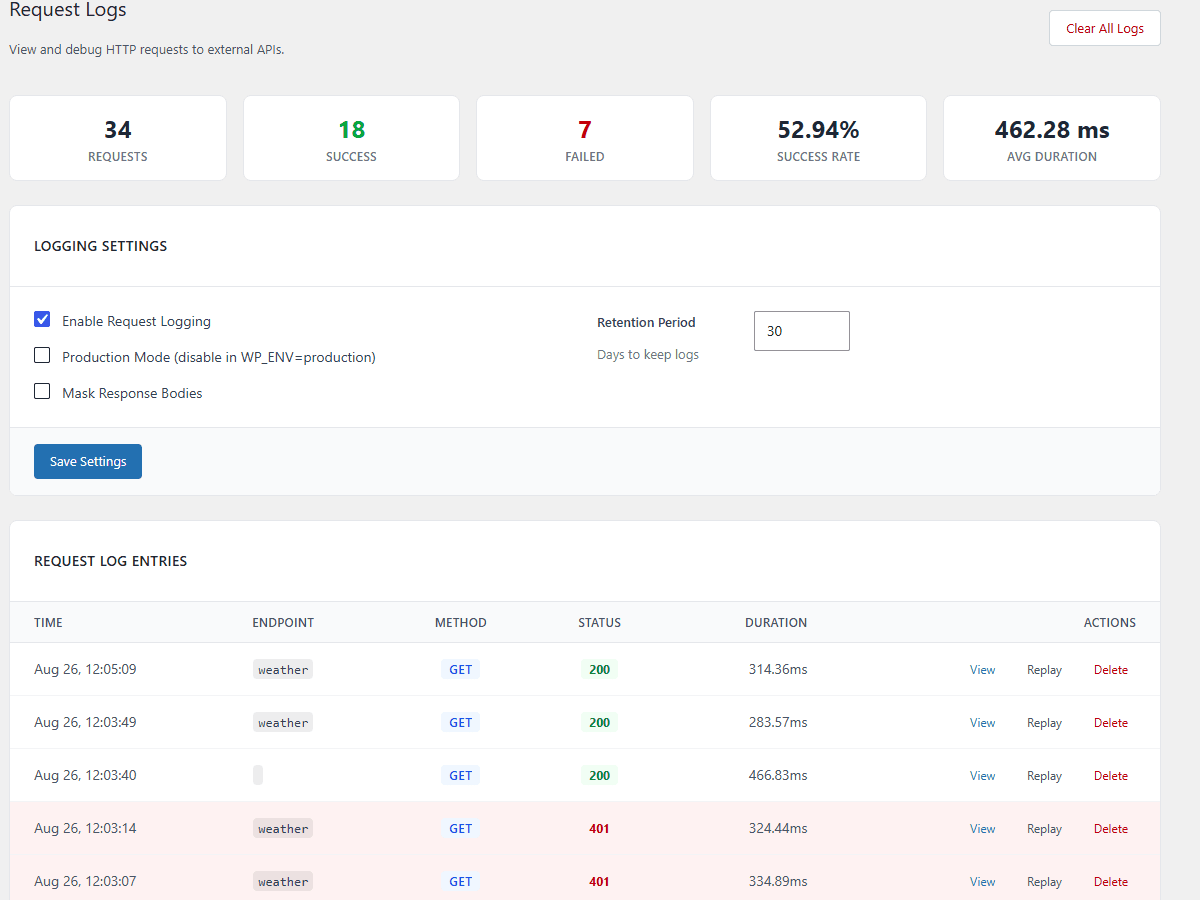
The whole workflow is in the WordPress admin.
Use cases
What people connect.
All of these are API connections, not native integrations: if the system exposes a REST API and you have credentials for it, WP API Forge can call it and render what comes back.
Live pricing
Rates that change on the source system — currency, commodities, tariffs — read from its API instead of retyped into a page each week.
Availability
Stock levels, seats or slots pulled from the booking or inventory platform that owns them, if it exposes a REST API.
Product information
Specs, catalogue fields or media served from a PIM, headless CMS or store API and rendered inside your WordPress layout.
CRM and business data
Counts, statuses or account details from the CRM or internal service, shown on a member page or an internal dashboard.
Market and public data
Weather, exchange rates, transport or open-government feeds — the public APIs a marketing page keeps wanting.
Internal business APIs
The service your team already built. Point an endpoint at it, authenticate, and it renders like any other content.
External content
Posts, events or listings held in another platform, displayed here without a second CMS to maintain.
Features
Everything the plugin can do.
Anything marked Pro needs a licence. Everything else is in the free version.
Requests
- GET requests
- Query parameters, headers and request body
- Endpoint testing with the raw response
- POST, PUT, DELETE and PATCHPro
Authentication
- API key, in a header or the query string
- Bearer token
- Basic auth
- OAuth 2.0 with automatic token refreshPro
Data
- JSON path extraction
- Single filter on the response
- Arrays and lists with custom templatesPro
- Visual response mapperPro
- Multiple filters combined with ANDPro
WordPress
- Gutenberg block with endpoint selector
- [eac_api] shortcode, live on the front end
- Works in Elementor and other builders
- [eac_api_loop] for repeating templatesPro
Performance
- Response caching with a per-endpoint lifetime
- Per-placement cache override
- Fallback content when a request fails
- Conditional caching rules by status or contentPro
Developer
- PHP API for fetching and registering endpoints
- Hooks and filters throughout
- Request logging, with credentials masked
- JavaScript event triggersPro
Automation
- Cron-scheduled requestsPro
- WordPress hook triggersPro
- Email notification when a trigger failsPro
- Request replay from the logPro
For developers
A real PHP API underneath the interface.
Everything the admin does is available in code. eac_get_endpoint_data() fetches from a configured endpoint with caching and JSON paths, eac_register_endpoint() creates endpoints programmatically, and eac_test_endpoint(), eac_clear_endpoint_cache() and eac_extract_json_path() cover the rest of the round trip.
// Fetch a value from a configured endpoint, cached
$temp = eac_get_endpoint_data( 'weather', [
    'json_path' => 'current.temp_c',
    'cache'     => 'default',
] );

// Reshape a response before anything renders it
add_filter( 'eac_endpoint_data', function ( $data, $endpoint, $args ) {
    return $data;
}, 10, 3 );

// Gate your own code on the licence tier
if ( eac_is_pro() ) {
    // Pro-only path
}
Filters
eac_endpoint_data, eac_shortcode_html_output, eac_rest_public_access and eac_license_features intercept the data, the markup, the public route and the tier definitions.
Actions
eac_plugin_initialized, eac_endpoint_registered, eac_trigger_executed and eac_trigger_failed give you somewhere to hang your own logic.
JavaScript events
A Pro trigger fires a configured request from a JavaScript event on the front end, for endpoints you have explicitly enabled for that use.
Caching and responses
Cache strategy is per call — default, no-cache or force-refresh — and failures come back as a WP_Error you can handle.
Free vs Pro
Start free. Upgrade when the work asks for it.
The free version is a complete read-only workflow, not a trial — nothing in it expires. Pro is for write operations, automation, and more than three endpoints.
| Feature | Free | Pro |
|---|---|---|
| Endpoints | 3 | Unlimited |
| GET requests | Included | Included |
| Write methods | Not included | Included |
| API key and token auth | Included | Included |
| OAuth 2.0 | Not included | Included |
| Encrypted credentials | Included | Included |
| JSON path extraction | Included | Included |
| Visual response mapper | Not included | Included |
| Shortcode and block | Included | Included |
| Lists and loops | Not included | Included |
| Response caching | Included | Included |
| Conditional cache rules | Not included | Included |
| Endpoint test panel | Included | Included |
| Automation triggers | Not included | Included |
| Request logs | 7 days | 90 days |
| Request replay | Not included | Included |
| Support | Community | Priority |
Every Pro plan carries the same features. The only difference is how many sites the licence covers: $49 for one site, $79 for three, $149 for unlimited.
Pricing
One price per year, priced by sites.
Pro subscriptions are handled by Freemius, which also delivers premium updates, licence management and support for as long as the subscription is active.
Personal
$49/year
1 site
One site of your own, with every Pro feature switched on.
Everything in Free, plus:
- Unlimited endpoints
- POST, PUT, DELETE and PATCH
- Lists and loops with custom templates
- OAuth 2.0, response mapper, advanced caching
- Automation triggers and 90-day logs
- Priority email support, 24-hour response
Business
Most popular$79/year
3 sites
A live site plus staging, or a small portfolio you own.
Everything in Personal, on 3 sites:
- Unlimited endpoints
- POST, PUT, DELETE and PATCH
- Lists and loops with custom templates
- OAuth 2.0, response mapper, advanced caching
- Automation triggers and 90-day logs
- Priority email support, 24-hour response
Agency
$149/year
Unlimited sites
For agencies, freelancers and developers running client sites.
Everything in Business, uncapped:
- Unlimited endpoints
- POST, PUT, DELETE and PATCH
- Lists and loops with custom templates
- OAuth 2.0, response mapper, advanced caching
- Automation triggers and 90-day logs
- Priority email support, 24-hour response
Free
$0
For getting started with API connections. Not a trial — nothing expires.
- 3 endpoint configurations
- GET requests
- Bearer token, API key and basic authentication
- JSON path extraction
- [eac_api] shortcode
- Gutenberg block
- Configurable caching
- Visual test panel
- 7-day request logs
Built to be trusted with credentials
The parts you’d only notice if they were missing.
Credentials handled properly
Keys are encrypted with AES-256-GCM using your own WordPress salts before they are stored — or define a wp-config.php constant and they never enter the database at all. Either way they are masked in the logs.
Nothing public by accident
The plugin registers a REST route per endpoint, and it is off until you enable it for that specific endpoint. Configured APIs are not exposed to visitors by default.
Cached, and quiet about it
Each endpoint has its own cache lifetime — an hour by default, zero to disable — and request logging runs asynchronously, so neither one sits in the way of a page load.
Predictable when an API fails
Cached data is served where it exists, your fallback text renders where it does not, and the error goes to the request log instead of the page.
Plays with the stack you have
WordPress 5.0+ (tested to 6.7), PHP 8.0+, GPLv2 or later. WooCommerce HPOS compatibility is declared, and shortcodes render in Elementor and other page builders.
Uninstalls completely
Removing the plugin removes its options, tables, scheduled events and log files, on single sites and multisite alike.
Common questions
A WordPress plugin that connects your site to external REST APIs. You configure an endpoint in the admin, test it, choose the data you want with a JSON path, and display it with a shortcode or a Gutenberg block. The free version is a complete read-only workflow; Pro adds write methods, automation and scale.
Any REST API that returns JSON: public APIs, SaaS platforms such as Airtable, Notion and Stripe, and your own internal or custom backends. GraphQL works through a REST wrapper. If you can call it with Postman or cURL, you can connect it here.
GET is in the free version. POST, PUT, DELETE and PATCH are Pro features, along with the request body editor that goes with them.
Not for the standard workflow. Endpoints are configured and tested visually, and the shortcode is generated for you. Coding starts to matter for advanced work — custom loop templates, hooks, JavaScript triggers — and there is a documented PHP API for exactly that.
Yes. Pick a value with a JSON path and place it in any post, page or builder layout. Pro adds the loop shortcode, which repeats your own template for each item in an array.
Yes. A block ships in the free version with an endpoint selector, so data can be placed in the editor without touching a shortcode.
[eac_api] is the free shortcode and [eac_api_loop] is the Pro one for lists. Both render in the block editor, the classic editor, and any page builder that supports shortcodes, including Elementor.
Three endpoint configurations, GET requests, bearer token, API key and basic authentication, encrypted credential storage, JSON path extraction, the [eac_api] shortcode, the Gutenberg block, configurable caching, the visual test panel, and 7-day request logs. None of it is time-limited or trial-based.
Unlimited endpoints; POST, PUT, DELETE and PATCH; the loop shortcode with custom templates; multiple filters; the visual response mapper; OAuth 2.0 with automatic token refresh; conditional caching rules; automation triggers on cron, WordPress hooks and JavaScript events, with email notification on failure; 90-day logs with request replay; and priority email support.
Pro is licensed and delivered through Freemius. A licence covers a set number of sites — one on Personal, three on Business, unlimited on Agency — and it is what entitles you to premium updates and priority support. You activate it from the plugin’s licence screen in the WordPress admin.
Yes. eac_get_endpoint_data() fetches from a configured endpoint with caching and JSON paths, eac_register_endpoint() configures endpoints in code, and filters such as eac_endpoint_data and eac_shortcode_html_output let you reshape the data or the markup before it renders.
Every endpoint has its own cache lifetime, one hour by default, and zero disables it. A single placement can override that with cache="no-cache" or cache="force-refresh". Caching only on certain status codes or response contents is a Pro rule.
The free version is a public WordPress.org plugin with no site limit — the limit is three endpoints per site. Pro licences are counted per site: Personal covers one, Business three, Agency unlimited.
Your site keeps working and nothing is deleted: endpoints, settings, credentials, logs and shortcodes stay exactly as they are, and the free version is never time-limited. An active licence is what entitles you to premium updates and priority support, so those are what lapse. Renewal terms are shown by Freemius at checkout.
Plugin support: support@cleardigitalstudio.com
Get started
Connect your first API today.
Start free and upgrade when you need advanced API workflows.
Need a custom integration? See what the studio builds